Question 5: Live Feed Form UI
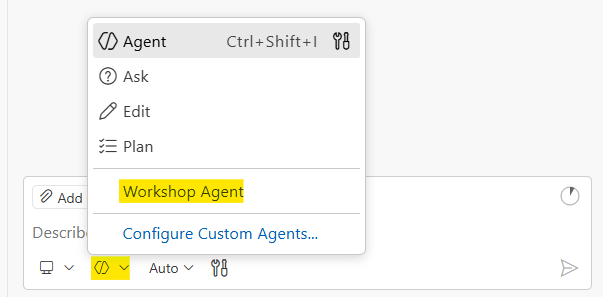
Before you start: Make sure you’ve selected the Workshop Agent in GitHub Copilot Chat. Open QUESTION-5-START-HERE.md in the question-5-live-feed-form folder and keep it open while you work. This loads the AI context GitHub Copilot needs to help you effectively.
Why This Problem?
This problem teaches a critical real-world lesson: Developers build scripts. Real value comes from making those scripts accessible to everyone.
Your script from Question 4 works great. But business users don’t run scripts. They use forms. Your job is to turn your developer tool into a product anyone can use.
The Scenario
The marketing team loved your demo from Question 4. They want to post workshop highlights themselves, without asking you to run a script every time.
Build them a web form.
Technology
This is a frontend problem. Unlike previous questions, there is no language choice. Your solution must use HTML, CSS, and JavaScript. Don’t over engineer things, no need for front end frameworks (React, Angular, NextJS, Remix.js, etc.).
Requirements
Build a form that:
- Collects their name, message, and tags
- Submits to the live feed API
- Shows success/error feedback
- Links to the live feed so they can see their post
Field Specifications
| Field | Required | Constraints |
|---|---|---|
| Name | Yes | Max 100 characters |
| Message | Yes | Max 1000 characters |
| Workshop | Yes | Pre-fill with “AI Interview Workshop” |
| Tags | Yes | See tag requirements below |
Tag Requirements
Tags have specific rules:
- No spaces allowed in tag names. Use dashes instead (e.g.,
workshop-fun, notworkshop fun) - The tag
ui-submissionmust always be included and cannot be removed by the user - Show tags as clickable chips/badges, not a comma-separated text field
- Users can click suggested tags to add them, or type custom tags
- Selected tags should be removable (except
ui-submission)
Suggested tags to offer: charlotte, hornets, panthers, naruto, attack-on-titan, legend-of-the-galactic-heroes, steinsgate, treasure-planet, computer-science, software-engineering, unc-charlotte, workshop-fun
The ui-submission tag is how form submissions are identified. Posts with this tag appear in the UI Submissions section of the live feed. Posts without it appear in Script Submissions. Your form MUST always include this tag.
UX Requirements
- Loading state: Show “Submitting…” and disable the submit button while waiting
- Success state: Show a success message with a link to the live feed (opens in new tab)
- Error messages: Be specific: “Name is required”, “Message is too long (max 1000 characters)”, “Tags cannot contain spaces”
- Validation: Validate client-side before submitting
Creativity Welcome
These requirements provide the technical specifications, but there’s a ton of room for your own creativity. Make it your own while meeting the requirements!
API Reference
You’re using the same API from Question 4.
POST endpoint: https://live.segunakinyemi.com/api/post
Fields:
| Field | Type | Notes |
|---|---|---|
Name | string | Required |
Message | string | Required |
Workshop | string | Required, suggest pre-filling |
Tags | string | Comma-separated list |
WorkshopKey | string | Same key from Question 4 (found in workshop-config.json at the repo root) |
Success response:
{
  "success": true,
  "message": "Posted successfully!",
  "id": "recXXXXXXXXX"
}
Workshop Workflow
1. Plan
Read through the requirements above carefully. All technical specifications are provided. Then think through:
- Form layout and fields
- Validation rules
- Error message display
- Success state and next steps
2. Prove
Direct AI to build your solution in question-5-live-feed-form/. Before testing, predict what should happen when you submit the form. Then submit a post and verify:
- The form validates correctly
- The POST succeeds
- Your post appears in the UI Submissions section of the live feed (not Script Submissions)
If your post only appears in Script Submissions, you forgot the required ui-submission tag.
3. Explain
Walk through your code: how the form collects and validates input, how the fetch call works, and why the business team needs a form instead of running your script.
Deliverables
Your code goes in three files in the question-5-live-feed-form/ folder. Open these files and write your code in them:
index.html— Build your form structure herestyles.css— Add your styling herescript.js— Add your JavaScript and API call logic here
Visual verification is the test for this problem. Your form works if you can submit a post and see it appear on the live feed.
Make It Your Own
Once your form submits successfully and posts appear in the UI Submissions section of the live feed, the core requirements are done. Now comes the fun part.
Customize the look and feel. This is your chance to make something you’re proud of. Change the colors, fonts, layout, spacing, whatever you want. Try a dark theme. Try a gradient background. Try making it look like a social media app. The goal is to make it look cool and feel polished, not just functional.
Think like a product designer. Step back and ask yourself: if a non-technical business user sat down at this form, what would make their experience better? What’s confusing? What’s missing? Here are some ideas to get you thinking:
- Character counters that show how many characters are left for Name and Message, so users don’t hit limits by surprise
- A post preview that shows users exactly what their post will look like before they submit
- Form persistence using localStorage, so if someone accidentally refreshes the page they don’t lose everything they typed
- A dark mode toggle because every good app has one
- Rich text editing for the Message field (think Google Docs style), so users can bold, italicize, and format their posts
- Tag autocomplete that suggests tags as users start typing
- Animations and transitions on submit, success, and error states to make the UI feel alive
- A confirmation dialog before submitting so users can double check their post
- Responsive design that looks great on both desktop and mobile
These are just starting points. Come up with your own ideas too. The best features are the ones you think of yourself.
The Real-World Connection
This is exactly what happens in software companies every day:
- Developer builds a script/tool for internal use
- Business team says “we want to use it too”
- Developer wraps it in a UI
- Now it’s a product, not just a tool
The ability to turn developer tools into user-facing products is a valuable skill. And the developers who care about design, usability, and the little details are the ones who stand out.