The Surface Area Debate
There are questions I keep hearing, from colleagues, from friends, on Reddit, on Hacker News, in group chats. They all come in different flavors, but they boil down to the same thing. “Which AI coding tool should I be using to get the best results?”
The responses to that question are endless. Conflicting, contradictory, everyone-has-a-different-answer-and-they’re-all-absolutely-sure-they’re-right. As a software engineer expected to be on top of the latest with AI, it can cause a real sense of FOMO. Sometimes even impostor syndrome. But that feeling fades every time I dive deep to get to the truth behind the noise.
When it comes to GitHub Copilot specifically, and its many surface areas (ways of interacting with a tool, like the CLI, VS Code, the web, and more), here’s the kind of stuff I see people asking.
- Which surface area should I use if I want the best results out of coding with AI?
- Why is everyone talking incessantly about the CLI these days?
- Is the CLI doing something that wasn’t happening before using GitHub Copilot in Agent Mode in VS Code?
- Is GitHub Copilot in VS Code fundamentally a different thing than GitHub Copilot on the web and in the CLI?
- In what cases does it make sense to use the CLI vs using the VS Code Chat?
- If I use the CLI, should I even be reviewing the code? How do I review changes across many files in the CLI? If the answer is “use an IDE” then why did I leave the IDE in the first place?
- Isn’t there literally a terminal inside VS Code? So why are we acting like this is CLI vs VS Code when you can do both at the same time?
- Why are we using a terminal as a chat interface when we already had a chat interface?
- Which one of these do I need to use to keep my “AI adoption” metrics high, and me off layoffs.fyi?
If you’re confused, you’re not alone.

Nothing good comes from confusion, and in this age of AI, it feels like everybody’s talking, contradicting one another, and making things sound more complicated than they really need to be. Let’s get some answers.
Why GitHub Copilot
I’m a software engineer at a company you’ve probably heard of, and I use GitHub Copilot daily across its many surface areas (ways of interacting with a tool). CLI, VS Code, GitHub.com, you name it.
This article focuses on GitHub Copilot specifically, but the core lessons apply to every AI coding tool out there. Claude Code, OpenAI Codex, Gemini CLI, Antigravity, Cursor. They’re all great.
But Microsoft is so invested in GitHub Copilot, and so good at enterprise licensing, that if you have a corporate job there’s a very real chance you’ll be using it whether you chose it or not. But unlike a similarly named Microsoft product, GitHub Copilot doesn’t suck. The GitHub Copilot CLI has caught up with Claude Code to where the differences between the two are negligible. VS Code is the world’s best IDE, and GitHub Copilot Chat works beautifully within it. So if you’re a corporate wage slave employee, you’re best served learning how to use it well.
That said, the learnings here, specifically around Context Engineering, apply to all AI coding tools.
Where This Confusion Comes From
This whole debate is a direct result of Claude Code being so popular. It popularized terminal-based AI coding, vibe coders latched onto it, and Microsoft caught up by pushing the GitHub Copilot CLI. Now there are CLIs, web interfaces, and IDE extensions everywhere. The options multiplied, but nobody stopped to explain that the underlying AI is the same.
Part of the problem is history. GitHub Copilot launched in 2021 as an underwhelming autocomplete tool, didn’t get chat until 2023, multi-file edits until late 2024, and full Agent Mode until early 2025. A lot of people formed their opinion during the autocomplete era and never updated it.
Microsoft’s legendary inability to name things clearly doesn’t help either. Even Simon Willison, co-creator of Django and one of the most respected voices in AI-assisted coding, tweeted asking “Is the Microsoft product called Copilot the same thing as GitHub’s product called Copilot?” If he’s confused by Microsoft’s naming, you definitely shouldn’t feel bad.
This confusion isn’t limited to users of GitHub Copilot though. It’s everywhere. In a recent Reddit thread about the Claude Code VS Code extension, one user put it plainly.
I can’t figure out if there’s a difference between CLI, web and VS Code extension. I feel like they all work.
To which another replied:
Same, as someone who does not know a lot about the technical bts, it’s kind of confusing to pick one.
That exchange is a microcosm of what I’m trying to bring clarity to. The same exact confusion, playing out across AI coding tools, not just GitHub Copilot.
People are asking “which one is the best?” when the answer is that they’re all fundamentally the same LLM-powered, context window limited, Agentic AI, reading the same codebase (yours), calling the same models, constrained by the same token limits, just behind different interfaces.
That’s not to say the surface area you choose doesn’t matter at all. But it’s not what makes or breaks your results.
Hopping from GitHub Copilot Chat to GitHub Copilot CLI and typing the same prompt won’t change much, other than you discovering that LLMs are non-deterministic.
What actually moves the needle is Context Engineering. If you haven’t encountered the term yet, Philipp Schmid, a Staff Engineer at Google DeepMind, defines it well.
Context Engineering is the discipline of designing and building dynamic systems that provide the right information and tools, in the right format, at the right time, to give an LLM everything it needs to accomplish a task.
Philipp Schmid - The New Skill in AI is Not Prompting, It’s Context Engineering
It’s the evolution of prompt engineering. Instead of obsessing over how to phrase a single question, you’re engineering the entire environment the AI operates in. Instructions, tools, memory, examples, quality gates. Anthropic also frames it nicely.
Good context engineering means finding the smallest possible set of high-signal tokens that maximize the likelihood of some desired outcome.
Invest in Context Engineering, and every single one of those surface areas gets better. All of them. At the same time.
One GitHub Copilot, Many Doors
There is one GitHub Copilot. One.
The GitHub Copilot docs and the VS Code docs spell this out clearly. GitHub Copilot runs in different environments depending on when you need results and how much oversight you want. The two key dimensions are where the agent runs (your machine or the cloud) and how you interact with it (interactively or autonomously in the background).
From a single dropdown in VS Code, you can pick between all of them. Local GitHub Copilot Chat for interactive work, GitHub Copilot CLI for background tasks, or a GitHub Copilot Cloud Agent for PR-based workflows.
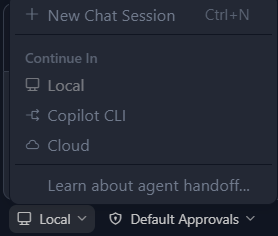
Or you can go directly to each surface area on its own. Run the CLI in your terminal or assign an issue to a Cloud Agent on github.com. They’re not different tools. They’re different windows into the same tool. The difference is the interface.
- GitHub Copilot Chat. VS Code, Visual Studio, JetBrains, etc. Agent Mode, chat, inline suggestions.
- GitHub Copilot CLI. Your terminal. Any terminal (including the one’s inside of IDE’s). Terminal-native AI coding assistant.
- GitHub Copilot Cloud Agent. GitHub. Assign issues to agents, get PRs back.
- GitHub Copilot on GitHub.com. Immersive chat about your repos.
The CLI Craze
Somewhere along the way, a UI preference got confused for a quality difference.
I believe the Claude Code craze has some people thinking that by using the CLI you are uniquely doing something you weren’t before. That the terminal is somehow producing better output because… it’s a terminal? It’s the same AI. Same models. Same codebase.
And here’s what’s left me the most perplexed throughout the CLI craze. There’s a terminal in VS Code. It’s been there for years.
You can use the GitHub Copilot CLI inside VS Code while also using the chat at the same time. You don’t have to choose. They literally work together by design.
Anyone saying stuff like “GitHub Copilot CLI is way better than VS Code Chat,” or “I switched to the CLI and my productivity 10x’d,” or “Stop using VS Code, the terminal is the future,” or “Why I ditched VS Code Chat and never looked back” is either misinformed, misleading others, or just flat out wrong.
Stop the cap. They are not competing products. You should use what you feel comfortable with. I mean, VS Code will literally call the CLI for you if you set the chat window to “Background.” And again, there’s a terminal in VS Code.
Now, to be clear, the CLI absolutely has its place. Terminal-native workflows, background tasks, fire-and-forget automation. It’s great for all of that. Once I have a plan I trust, I give things to the CLI for it to do the needful.
But the reason any of it works well isn’t because the CLI has some magic that GitHub Copilot in VS Code or the other surface areas doesn’t. It’s because of good Context Engineering.
Context Engineering Is What Actually Matters
In GitHub Copilot’s ecosystem, Context Engineering comes down to a set of features that work across every surface area. They’re not tied to one interface. They live in your repo. For a detailed comparison, see the GitHub Copilot Customization Cheat Sheet.
-
Custom Instructions. Tell the AI how your team works. Scoped broad or granular with glob patterns. (GitHub Docs, VS Code Docs)
-
Custom Agents. Specialized modes for specific workflows like code review, documentation, onboarding new services, or migration. (GitHub Docs, VS Code Docs)
-
Agent Skills. Packaged domain knowledge the agent loads on demand. Think of it like codified tribal knowledge that AI can use whenever. (GitHub Docs, VS Code Docs)
-
Prompt Files. Reusable, parameterized prompts for repeatable tasks. (GitHub Docs, VS Code Docs)
-
MCP Servers. External tool connections for databases, APIs, and internal services. I’ve written about MCP here. (GitHub Docs, VS Code Docs)
-
Agent Hooks. Automated quality gates. Linting, tests, formatting, automatically. (GitHub Docs, VS Code Docs)
-
Agent Plugins. Bundle all of the above for easy distribution across teams and repos. (GitHub Docs, VS Code Docs)
Same context, same instructions, same results. Regardless of which surface area you’re in. No surprises. No “it works differently in the CLI than in the Chat.” You can even hand off sessions between them, starting a plan in VS Code GitHub Copilot Chat and finishing with a pull request generated by the CLI running in the background.
This is where knowledge workers who understand the problems the business needs solved are still incredibly valuable. We don’t write all the code by hand anymore, but there’s still a lot of work for us to do for AI to not suck. AI doesn’t know your domain, your standards, or your edge cases. You do. Write it down. That’s the job now.
The Bottom Line
What produces better output is Context Engineering. Custom Instructions, Custom Agents, Agent Skills, Prompt Files, MCP Servers, Agent Hooks, Agent Plugins. These are the levers. They work across every surface area. Invest in them, and the AI gets better everywhere.
Stop optimizing where you type. Start optimizing your context.
Related Reading and Resources
- VS Code Context Engineering Guide. Walkthrough of how to apply Context Engineering in VS Code with GitHub Copilot.
- VS Code Agents Overview. Practical guide on which surface area to use for which task.
- Awesome Copilot. Curated collection of Context Engineering tools, plugins, and resources for GitHub Copilot.
- GitHub Copilot CLI for Beginners. Great starter course if you want to learn the CLI.
- Mastering GitHub Copilot for Paired Programming. Deeper dive into working with Copilot across workflows.
- Accelerate App Development Using GitHub Copilot. Structured Microsoft Learn path for those who want the full curriculum.
- Agentic AI: From Acronyms to Applications. My post on the broader Agentic AI landscape.
- Coding Is Dead. Software Engineering Isn’t.. My post on how AI changes the craft of software engineering.
Have thoughts, questions, or want to share your own setup? Find me on LinkedIn.